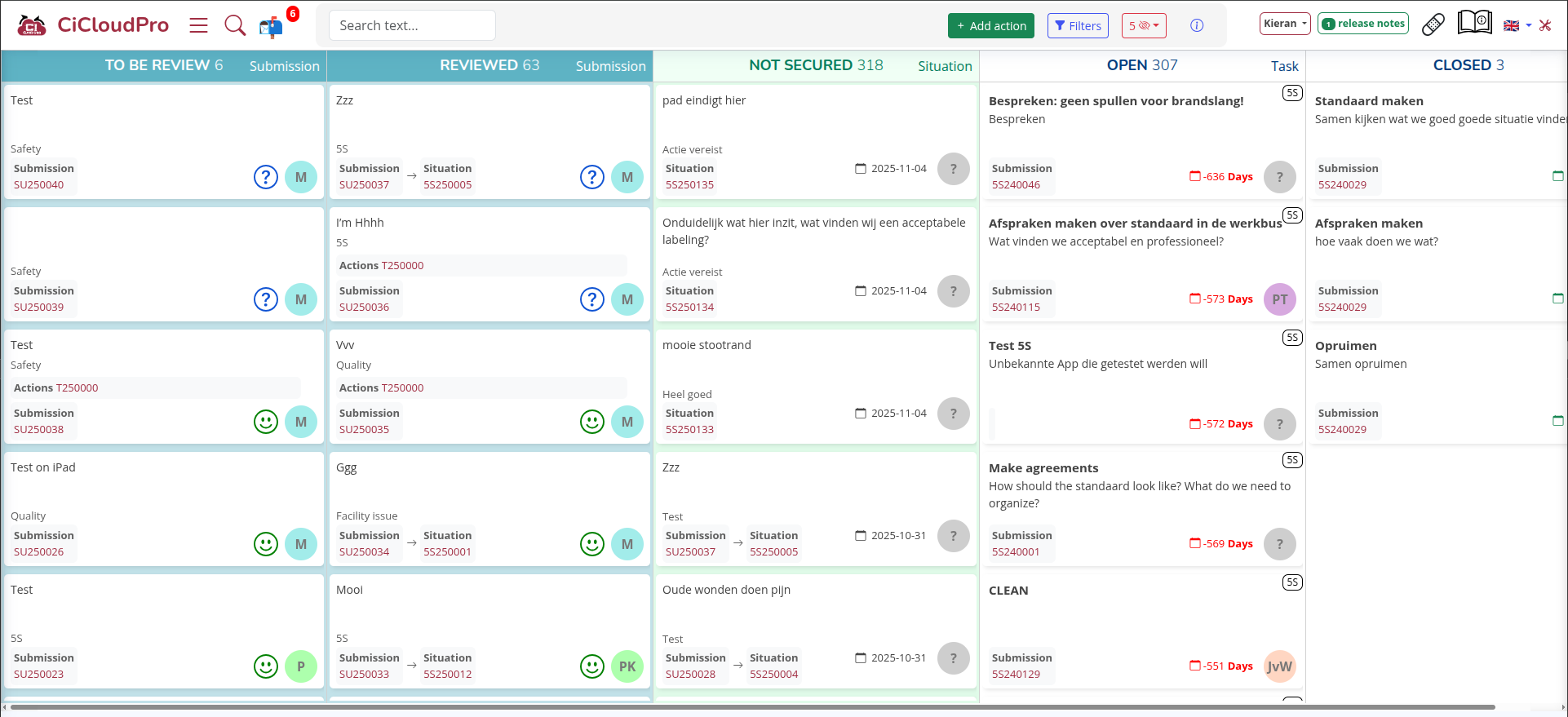
A project board is a visual workspace where you manage all the work items in a project in one place. Tasks are represented as cards and grouped by status, such as “To do”, “In progress” and “Done”. At a glance you see what needs attention, who is responsible and how far along everything is.
CICloudPro’s Project Board takes this idea further. It brings together tasks, reports, audits, safety actions and improvement ideas from different CICloudPro apps into a single, real time overview. That helps you move from scattered lists and emails to a clear execution framework where every action has an owner, a deadline and a status.
What People Actually Search For About Project Boards
When people look for information about project boards, they often have very practical questions. Common searches include:
- What is a project board in project management?
- How do I use a project board to track tasks?
- What is the difference between a project board and a Kanban board?
- How can a project board help with safety, audits and compliance?
- Is a project board only for IT teams, or can operations and factories use it too?
- How hard is it to implement a project board in my company?
The rest of this article is written to answer exactly those questions, using CICloudPro’s Project Board as a concrete example.
What Is a Project Board in Simple Terms
A project board is a structured way to visualize your work. Instead of tasks hiding in spreadsheets, emails or notes, you place them on a board where everyone can see them. Each task becomes a card that moves through a set of stages that reflect your workflow.
A basic project board usually has columns like:
- Backlog / To do for tasks that still need to be started
- In progress for work that is currently being done
- Review / Approval for work that needs checking
- Done for completed tasks
You can keep it that simple or make it more detailed, for example by adding columns for “Pending information”, “Waiting for supplier”, “On hold” or “Validated”. The strength of a project board is that it adapts to the way your team actually works.
Project Board vs Project Governance Board
The term “project board” can be confusing, because it is used in two different ways.
- In project governance frameworks, a “project board” means a group of senior stakeholders who oversee the project at a strategic level. They approve budgets, review progress and make major decisions.
- In day to day project management, a “project board” is the visual board where tasks are tracked and moved from left to right as the work progresses.
This article focuses on the second meaning. CICloudPro’s Project Board is a digital board for tracking tasks, actions and follow up items coming from different parts of your operations.
What Types of Work Can You Manage on a Project Board
A board is useful for almost any type of work that can be broken into actions. In CICloudPro, typical examples include:
- QHSE and safety actions after incidents, near misses or risk observations
- Audit findings that require corrective or preventive measures
- 5S and continuous improvement tasks coming from Gemba walks or improvement ideas
- Operational reports that lead to follow up actions for production, logistics or maintenance
- General tasks that need clear ownership and deadlines across teams or locations
Outside CICloudPro, teams also use project boards for software development, marketing campaigns, HR initiatives, maintenance planning and many other domains. The principle is always the same. Make work visible, assign owners, track status and reduce the risk of things being forgotten.
Why a Project Board Is Better Than Spreadsheets and Email
Many teams try to manage actions using long spreadsheets, shared inboxes or chat messages. It works for a while, but as soon as the volume of work grows or more people get involved, the system starts to break.
A project board solves several common problems:
- Lack of visibility
With spreadsheets, it is hard to see at a glance what is urgent, what is blocked and who is overloaded. A board gives you a clear visual overview in seconds. - No real ownership
When tasks live in email threads, responsibility is unclear. On a board, each card has one or more named owners. - Out of date information
Files get copied, downloaded and saved locally. Nobody knows which version is current. A board is always live and up to date for everyone. - No workflow
A spreadsheet is just a table. A board reflects your actual process, from submission to completion, including review and approval steps.
For operations heavy and compliance driven companies, these differences are not just about comfort. They directly impact safety, quality and regulatory compliance.
How CICloudPro’s Project Board Works
CICloudPro’s Project Board is built for organizations that run a lot of structured processes, such as incident reporting, audits, 5S checks and operational reporting. Instead of treating these as separate islands, the board brings all follow up actions into one central place.
1. Unified view across CICloudPro apps
CICloudPro includes multiple apps for reporting, QHSE, 5S, audits and more. Each app generates items that often require follow up actions. The Project Board collects these actions and displays them together.
That means you no longer need separate lists for safety, audits and improvements. All actions appear as cards on the board, tagged with their source app and relevant metadata such as site, department or category.
2. Clear workflow from submission to completion
Every card on the Project Board follows a workflow that matches your process. A typical flow can look like this:
- New action created from a report, audit or form
- Action assigned to an owner or team
- Action moves to “In progress” once work starts
- Action moves to “Awaiting review” or “Awaiting validation”
- Action marked as “Completed” when everything is done
You can adapt the stages to your own needs. For example, you might add steps for risk assessment, approval by a manager, verification by QHSE or sign off by an auditor. The important thing is that each step is visible and traceable.
3. Ownership and accountability built in
Each card on the Project Board has a responsible person or team, due dates and all relevant context. This creates natural accountability. People see exactly which actions belong to them and managers can review progress without hunting for information.
The board also makes dependencies visible. If one action is blocked because another team has not completed their step, this becomes obvious in the overview. That makes it easier to unblock bottlenecks.
4. Powerful filtering and views
As the number of actions grows, filtering becomes essential. CICloudPro allows you to filter the Project Board by:
- Owner or team
- Source app (reporting, QHSE, 5S, audits, and others)
- Location, site or department
- Status or stage in the workflow
- Priority or risk level
These filters turn the Project Board into a flexible control room. Supervisors can focus on their area, site managers can filter on their plant and the leadership team can take a high level view across everything.
5. Real time reporting and dashboards
Because all tasks and actions are structured and tracked, CICloudPro can provide dashboards that show the state of your operations in real time. Examples include:
- Number of open actions per site, department or category
- Average completion time per type of action
- Overdue actions and recurring issues
- Trends over time in incidents, findings and follow up quality
These insights help you make decisions based on data. You can see where actions pile up, where processes work well and where additional resources or training might be needed.
6. Compliance, audit trails and security
For many CICloudPro customers, compliance and governance are non negotiable. The Project Board works within a secure environment where:
- Users have role based access and only see what they are allowed to see
- Actions and status changes are logged for audit purposes
- Data can be stored in EU regions to follow EU privacy rules
This combination of visibility and control is particularly helpful for QHSE teams, auditors and management, who need both transparency and reliable records.
Is a Project Board Only for IT Teams
Not at all. The idea of a board started in manufacturing and lean production, then was picked up by software development and IT. Today, it is used across almost every type of organization.
CICloudPro’s Project Board is especially valuable for:
- Manufacturing plants and factories
- Warehouses and logistics centers
- Maintenance and technical services
- Construction and field operations
- Any company with strong focus on QHSE, audits and continuous improvement
If your teams regularly perform checks, file reports, run audits or log incidents, then a project board is a natural way to turn these inputs into visible, trackable actions.
How Hard Is It to Implement a Project Board
The difficulty of implementing a project board depends on two things. The tool you choose and how complex your processes are. CICloudPro is designed for a fast start with the flexibility to grow.
In practice, a typical implementation looks like this:
- Define your main workflows, for example incident follow up or audit actions
- Agree on the stages these actions should pass through
- Connect your CICloudPro apps so that new actions are automatically created on the board
- Configure roles, permissions and dashboards
- Train key users and iterate on the workflow based on feedback
Because data is already structured in CICloudPro apps, you do not start from a blank slate. Many teams can get a functional board running very quickly and refine it step by step.
Why a Project Board Is Critical for Operations and Compliance
For operations heavy and compliance sensitive organizations, a project board is not only a visual add on. It becomes a central control tool. Here is why.
- Nothing gets lost
Every incident, finding or idea that leads to an action is captured as a card. You can see what is still open and follow up until it is done. - Better coordination between departments
Safety, production, maintenance and quality share the same view. Handovers between teams are visible and traceable. - Data driven improvement
By aggregating actions over time, you can recognize patterns. For example, recurring issues in a specific line, area or process. - Clear evidence for auditors
When auditors ask how you follow up on findings or incidents, you can show the Project Board, the history of each card and the completion statistics.
In short, the board becomes a living proof that you not only record problems, but that you actively follow up and solve them in a structured way.
Frequently Asked Questions About Project Boards
What is a project board?
A project board is a visual tool where you organize and track tasks. Each task is a card that moves through stages like “To do”, “In progress” and “Done”. It gives you and your team a shared view of what needs to be done, who is responsible and how far along the work is.
How is a project board different from a Kanban board?
In practice, many people use the terms “project board” and “Kanban board” for the same idea. Both show work items as cards that move across columns. A Kanban board usually focuses on limiting work in progress and optimizing flow, while “project board” is a broader term that can cover many types of workflows and projects.
What can I manage with CICloudPro’s Project Board?
You can manage follow up actions from CICloudPro apps, such as QHSE incidents, audit findings, 5S observations, operational reports and general improvement tasks. All these actions appear in one unified board where you can assign owners, set deadlines and track status.
Is a project board only useful for IT teams?
No. Project boards are used in manufacturing, logistics, construction, maintenance, healthcare and many other sectors. Whenever you have recurring actions, checks, reports or audits, a board helps you keep control and avoid losing track of important tasks.
How difficult is it to implement CICloudPro’s Project Board?
CICloudPro is designed so you can start quickly with a simple workflow and expand over time. Once your apps are configured, actions created from reports or audits are automatically added to the board. You then define the stages, permissions and dashboards that match your processes. Most organizations can reach a working setup in a short time and refine it based on real use.
Does the Project Board support compliance and audits?
Yes. Actions and status changes are logged, ownership is clear and dashboards give you a view of open, closed and overdue actions. This provides strong evidence for internal and external audits and helps demonstrate that you close the loop on incidents, findings and improvement opportunities.